An improvisation exercise for English retourists

The purpose of this improvisation exercise is to help you consolidate your knowledge and active use of verbs, phrases and expressions meaning ‘begin’ and to give you an opportunity to improvise a short presentation in English similar to something you might hear in a real meeting. You can also use this exercise to practise your presentation skills and get some feedback on your use of English.

The whole improvisation exercise should take you a maximum of 30 minutes, unless you want to do extra research on a topic area of your choice. You can tailor the exercise to suit your ability level and vocabulary lacunae; I have given hints as to how to do this. Be creative and have fun with it!

If you need a little more help with finding suitable phrases (and the right register), scroll down to the part of the post that is BELOW the exercise, for lots of suggestions.

Instructions

Choose between Option 1 (a short presentation) and Option 2 (playing the role of the Chairman of a meeting).

Option 1: prepare a short presentation

Pick onePick 2 or more adjectivesPick 2 or more verbs or phrasesPick 3 or more adjectives
PRODUCT LAUNCH: pair of smart glasses + smartphone app + trained assistants. Blind or visually impaired people wear the glasses and call an agent when they need help with everyday tasks (reading a recipe, separating laundry, buying an item in a cafe); the assistant can see what the blind person is seeing in real time. More info here: https://aira.io/

OR

CROWDFUNDING CAMPAIGN for an app to find the best way to get from A to B. The app can search bus routes, find taxis, buy train tickets, automatically post on carsharing websites, find hire cars and calculate the cost of fuel, and calculate projected CO2 emissions for the trip.

OR

a product, service, initiative, project or campaign of your choice
delighted
thrilled
honoured
excited
pleased
optimistic
gratified
daunted
nervous
elated
overjoyed
ecstatic
tickled pink
break new ground
pave the way for
blaze a trail
breath of fresh air
pioneer
usher in
initiate
launch
embark on
begin
start
originate
set about
groundbreaking
innovative
ambitious
unique
unprecedented
revolutionary
cutting-edge
pioneering
tantalising
trendsetting
radical
original
experimental
inventive
ingenious
state-of-the-art
creative
imaginative
inspired
visionary

Your task is to take the elements of your choice (type of presentation, adjectives describing feelings, phrases relating to ‘beginning’, adjectives describing your product or service) and prepare a 5 minutes oral presentation to pitch your product.

It is up to you to decide who you are selling or presenting your product to: potential investors? An NGO or charity?

Your presentation will have the following format:

  1. Brief intro to address the audience and introduce yourself and use your ‘feeling’ adjectives, e.g. ‘Ladies and Gentlemen, I am thrilled to have been invited to this conference to present our brand new product. I am, of course, a touch nervous at addressing such a knowledgeable audience, but I’m also confident that I will be able to convince you of the real benefits that our product can offer partially sighted people.’
  2. your presentation of the product/service/campaign, using the idioms and descriptive adjectives you have chosen.
  3. A conclusion or call to action (e.g. please invest/here is our website for further information/please spread the word etc.)

If you need a helping hand with the English: do some extra research by choosing a real product or service and visiting the website to pick up more vocabulary.

If your retour is already advanced: choose an area that you’re not very familiar with, and take the opportunity to increase your vocabulary in that field (e.g. robotics, engineering, IT, medicine).

Option 2: act as Chairman of a meeting

Depending on your level of English and knowledge of conference vocabulary, you can choose to keep it quite general, or much more specific.

Pick EITHER agenda 1, OR agenda 2 plus EITHER the product launch OR the crowdfunding campaignPick 2 or more adjectivesPick 2 or more verbs or phrasesPick 3 or more adjectives
AGENDA 1:
General Session of the AFB Leadership Conference 2018 —How Leading Tech Companies Are Raising the Bar for Blind and Visually Impaired Users
Panelists: Sarah Herrlinger, Director, Accessibility Policy and Initiatives, Apple; Mark Lapole, Lead Product Developer, AIRA (assistive technologies for the blind); Megan Lawrence, Accessibility Technical Evangelist, Microsoft; and Jeffrey Wieland, Director of Accessibility, Facebook
Description: Representatives from the world’s leading technology companies will share their insights on how they operationalize accessibility, engage with assistive technology users, and improve opportunities for persons with visual impairments.

OR

Agenda 2:
Adoption of the agenda, Minutes of previous meeting, Item 1 (presentation by Mr Michael Miller followed by Q&A), Item 2 (recent developments in the industry).

PRODUCT LAUNCH: pair of smart glasses + smartphone app + trained assistants. Blind or visually impaired people wear the glasses and call an agent when they need help with everyday tasks (reading a recipe, separating laundry, buying an item in a cafe); the assistant can see what the blind person is seeing in real time. More info here: https://aira.io/

OR

CROWDFUNDING CAMPAIGN for an app to find the best way to get from A to B. The app can search bus routes, find taxis, buy train tickets, automatically post on carsharing websites, find hire cars and calculate the cost of fuel, and calculate projected CO2 emissions for the trip.

OR

a product, service, initiative, project or campaign of your choice
delighted
thrilled
honoured
excited
pleased
optimistic
gratified
daunted
nervous
elated
overjoyed
ecstatic
tickled pink
break new ground
pave the way for
blaze a trail
breath of fresh air
pioneer
usher in
initiate
launch
embark on
begin
start
originate
set about
groundbreaking
innovative
ambitious
unique
unprecedented
revolutionary
cutting-edge
pioneering
tantalising
trendsetting
radical
original
experimental
inventive
ingenious
state-of-the-art
creative
imaginative
inspired
visionary

Your task is to chair the first five minutes of a meeting where an invited guest will be presenting an innovative new product/service/crowdfunding campaign.

If you chose Agenda 1:

You are the moderator of a general session at the AFB Leadership Conference (American Foundation for the Blind).

Your presentation will have the following format, but feel free to take liberties.

  1. Open the session
  2. Welcome panellists
  3. Introduce the first speaker, Michael Miller, CEO of the company that has created smartglasses for visually impaired people (more info here: https://aira.io/how-it-works or see below). Use your ‘feelings’ adjectives to describe how excited you are that he is here, and your idioms and other adjectives to say a few words about his product.
  4. Give Michael Miller the floor.

Description of the AIRA smart glasses: pair of smart glasses + smartphone app + trained assistants. Blind or visually impaired people wear the glasses and call an agent when they need help with everyday tasks (reading a recipe, separating laundry, buying an item in a cafe); the assistant can see what the blind person is seeing in real time.

If you chose Agenda 2:

  1. Decide what kind of meeting this is. You can keep it general, or be very specific (for example if you want to do some extra research and widen your vocabulary in a specific area).
  2. Start your oral presentation: go through the agenda as if you were in a real meeting (e.g. ask if the agenda can be adopted, ask if anyone has comments about the minutes of the previous meeting, maybe say a few words about how you intend to tackle items 1 and 2).
  3. Make a few housekeeping points of your own devising, for instance about timings of coffee breaks, colleagues who are absent, etc.
  4. Turn to Item 1, and introduce the first speaker, Michael Miller, who will be presenting the product of your choice (or the smart glasses or travel app). Use your ‘feelings’ adjectives to describe how excited you are that he is here, and your idioms and other adjectives to say a few words about his product/service/campaign.
  5. Give Michael Miller the floor.

4 ways to use your presentation:

  1. If there’s no-one at home who can listen to you, deliver your speech out loud to practise your delivery and presentation skills. Use a mirror or the camera on your smartphone!
  2. If you have a practice partner, record an audio file of yourself and ask your partner for feedback on your use of English and delivery.
  3. Film yourself and put the speech on Speechpool for others to use as practice material.
  4. If you’re a member of a practice group with people who have an English C, give them the speech as practice material!

Extra help with vocab

Here are some suggestions to help you with the exercise.
Some of these phrases are very useful during meetings, e.g. when the chair takes the floor for the first time, or when a speaker is presenting a new proposal or project. You may know most or all of them already, but this way you have them all in one place!

Getting down to business

First, a few expressions a chairman might use first thing in the morning, when the meeting begins, to indicate a general readiness to start work.

Ladies and gentlemen, I think it’s time to make a start.

It’s time to start today’s meeting.

Let’s begin the meeting.

Lower register and grumpy, verging on the rude and impatient, would be let’s get on with it.  Let’s get this show on the road! is idiomatic but rather conversational; you could perhaps use it if the speaker was being humorous or flamboyant. In most meetings, you wouldn’t get away with it’s showtime!

showtime

To show that his introduction or general remarks are done with, and it’s time to talk about the actual subject of the meeting, the chairman would use one of the following expressions (listed here in rough order of how specific they are).

Let’s get straight to it.

Let’s get down to business.

Let’s get down to brass tacks.

Without further ado, let’s turn to today’s agenda.

Shall we turn to the first item on the agenda?

Let’s start with an item of other business.

Let’s get straight on with the main point on today’s agenda.

Before we get to the nitty gritty, I want to give the Commission the floor on an item of other business.

First things first, I have a few points of housekeeping to discuss, before we move on to the agenda proper.

And to make sure that the beginning is auspicious, the chairman might say:

Let’s start as we mean to go on, and limit ourselves to two minutes’ speaking time each.

Who’s going to make the first move?

Someone has to be the first to speak in a debate. Here are some options for you in these circumstances:

Who’s going to get the ball rolling? Who’s going to set the ball rolling?

Who’s willing to kick off our discussion? *NOTE that willing to does not mean the same thing as wanting to!

The floor is open for your comments. Who would like to take the floor first? Who would like to comment first?

Who’s going to open the discussion?

Who wants to be the first to speak on this point?

Who’s going to break the ice?

Who’s going to dive in?

Chairman, I want to jump in at this stage, to clear up a misunderstanding.

A few verbs

The verb begin has many synonyms. Let me try to give you some hints on usage and nuance, so that you can decide when to use begin, start, originate, set about, usher in, embark on, launch, inaugurate, initiate and commence.

  • Begin is the most general verb, and start is a near synonym. They are virtually interchangeable. You can use both of them with an object or without:

We’ve begun our analysis of the text. We’ve started our analysis of the text.

The lecture begins at 9 a.m. The lecture starts at 9 a.m.

  • In some contexts, you can use get underway (meaning begin to happen) as a synonym when begin or start are intransitive; however, it is less concise than begin/start.

The lecture got underway at 10 a.m. The project got underway in 2012. The festival gets underway on 20th August. The Party Conference gets underway tomorrow in Cardiff.

  • To talk about the origin or inspiration of a proposal or project, use originate (intransitive). Avoid using originate with an object (i.e. don’t say who originated this expression? but rather where did this expression originate? or who coined this expression?)

The disease was thought to originate in Africa. This technology originated in the US.

  • Initiate is a formal way of saying cause something to begin. It needs an object, and often collocates with words meaning conversation, discussion, negotiations, consultations, but also goes well with words meaning initiative. You can use it in the passive voice as well:

The peace talks were initiated by the special envoy.

Our company initiated talks with competitors last year.

Arsenal ‘have initiated talks’ to sign Lille striker Nicolas Pepe in the January transfer window.

The minister was credited with initiating a series of welfare reforms.

  • Commence is also a formal or technical way of saying begin, and can be used either with or without an object. Familiar contexts for commence are space travel (commencing countdown…) and military activities (commence firing!). You will see from the examples that it sounds stilted in normal conversation, and is chiefly used in contracts or on very formal occasions.

Construction work is expected to commence in two weeks.

Legal proceedings will commence immediately.

The policy will commence under the abovementioned conditions.

The wedding ceremony will commence at noon.

  • Set about means begin doing something and takes a gerund (the -ing form of a verb):

He set about cleaning out the garage.

  • Embark on means to start a project, the nuance being that it is likely to be time-consuming or complex. It collocates well with nouns that mean journey (metaphorically), project, or venture, e.g. adventure, endeavour, programme, pursuit, undertaking, experiment.

She embarked on a new career at the age of 40.

The company has embarked on a risky new venture.

  • Inaugurate takes an object, and suggests the beginning of a significant era or of some formality. Personally, I would use usher in rather than inaugurate in the sense of usher in a new era.

The new political regime was meant to inaugurate a new era of peace and prosperity.

The peace envoy helped to inaugurate the new round of peace talks.

  • Usher in collocates well with nouns meaning era, such as period, cycle, season, spell, or time.

The political reforms ushered in a period of economic prosperity.

  • Launch means to set in motion. It takes an object and implies a deliberate act (as opposed to a phenomenon that occurs spontaneously). Speaking literally, you would launch a vessel, such as a rocket or a ship; metaphorically, you could launch a career, a business/company, an initiative/campaign, a project/programme/scheme, a new radio station/TV station, a product or service, and finally an attack/assault. You can use almost any synonym of the nouns I have listed with the verb launch, which is very versatile.

Being innovative

So… finally you’ve got something started: a project, a campaign, whatever. But are you a leader or a follower? Here are some phrases that can help express the idea of being innovative.

The early bird catches the worm.

Our company is blazing a trail.

We are spearheading this campaign. – when it’s not used in a military sense (to spearhead in invasion), spearhead means ‘lead a course of action’ and collocates with nouns meaning campaign, initiative, project.

Our pioneering work will pave the way for others to follow.

Our product breaks new ground.

This market needs new blood. Our company is shaking things up.

This young start-up is like a breath of fresh air in a stagnant market.

Out with the old, in with the new.

Our CEO pioneered this type of marketing.

Starting over

If you’re starting something all over again, you might be starting from scratch, starting over, going back to the drawing board (for example, when designing a product or drafting a text), or going back to square one.

These are all useful phrases in meetings if the proposal on the table is doesn’t suit the negotiating parties, for example.

If a person is beginning a new life or adopting a different attitude, they might be starting over, wiping the slate clean, starting afresh, turning over a new leaf (which implies behaving more responsibly), or making a clean break (cutting ties with bad influences, for instance, or moving on from a divorce).

Horses and races

A couple of idioms related to races:

We’re under starter’s orders means we are ready to perform a task. Here is an example from the news:

Potential buyers of a country house which boasts its own racing stables are under starter’s orders in an online auction which ends next month.

The starting gun/ the starting pistol has been fired, and we need to come up with a solution immediately.

The starting gun has been fired in a brutal leadership contest.

Hurrying up

There is a plethora of expressions meaning ‘hurry up’, many of which are fairly colloquial. The common theme here is that the speaker is urging someone to do something or go somewhere. These are generally unsuitable in a conference situation, either because of context (they don’t describe the act of beginning to examine a document, say) or register.

Let’s get moving!

Let’s get going!

Get a move on!

Shake a leg!

And something you might say to family members or your children: Get a wriggle on! Chop chop!

Here is an example of a suitable context for these phrases:

We have to leave the house before 5 o’clock, or we’ll be late for the show. Let’s get going! (or: Shake a leg! Get a wriggle on! etc.)

If you want to watch some TV this afternoon, you need to do your homework first. Get a move on!

Wow! That was epic! I hope this post has given you plenty of ready-made solutions to use in meetings.

Interested in more material like this to help you boost your retour? Why not join my monthly membership site, Rock your Retour, with tailor-made written materials and weekly live group classes (online)?
Interpreting Coach logo with strapline

Sophie Llewellyn Smith, writing as The Interpreting Coach, is a coach, interpreter trainer, conference interpreter, designer of online teaching materials, and creator of Speechpool. Follow the blog to pick up tips on how to improve your interpreting skills.

If you’re interested in personal coaching, why not book a free discovery call?

Self-care for interpreters during the pandemic: 5 supertips

5 supertips blog post image

I’m first and foremost an interpreter and trainer, but some of you may know I have a background in fitness training and complementary therapies.This means I’ve always had an interest in stress management and relaxation, which has led to developing webinars and seminars about self-care for interpreters.

Generally, I like to think I manage stress quite well.

However, the pandemic and lockdown have meant I’m less this:

… and more like this:

The pandemic has challenged all of us in many ways, and I won’t dwell on them here except to say homeschooling? Just no. According to my children, that is. Personally, I quite enjoyed learning about the Black Plague and prime factors, although it did, admittedly, make it almost impossible to get any actual work done!!

And breathe…

Now, I recently asked my interpreter trainers’ Facebook Group what they were most stressed about, and the responses were partly to do with factors beyond the respondents’ control and the reliability of the technology we’re now all dependent on, and partly related to the fact we’re joined at the hip with computers for hours every day, with resulting effects on fatigue, eyesight, and our hearing.

Pausing for a moment to give some thought to how interpreters have been affected by the pandemic and the resulting switch to home working (either in the form of RSI or attending training sessions online, teaching online, translating from home, etc.), I’ve drawn up a list of some of the main consequences of the fact that we’re more sedentary, more uncertain about the future, and largely glued to a computer screen.

  • stress and anxiety: the causes are obvious, from fear about coronavirus to anxiety about our professional future, career prospects, and income.
  • headaches: stress-related or caused by a poor home office set-up, bad sound when attending Zoom or other meetings, or eye strain from staring at a screen for hours.
  • dry, tired eyes: too many hours in front of a screen, exacerbated by poor lighting in the home office.
  • back, shoulder or neck pain or stiffness: from hunching over a laptop, an unergonomic set-up in the home office, or sitting down for too many hours every day.
  • tinnitus or other hearing problems: caused or exacerbated by stress or poor sound.
  • weight management issues: arising from different dietary habits due to lockdown, being less active, and feeling more stressed.

Now, I’m not saying everyone is experiencing all of these. Some people have taken the lockdown as an opportunity to get fit, quit drinking, clean up their eating habits, learn a language, and take up fantastic new hobbies. Kudos to them!

But if you’re finding it difficult, I’d like to share a few tips about self-care for interpreters.

When I first started thinking about this blog post, I instinctively thought of the simplest, most important tips for good health; those that underpin everything else. Because there’s little point twisting yourself into a pretzel with yoga, or getting a delightful back massage, if the basics aren’t in place.

However, it’s true that the basics sound…well…rather dull: get enough sleep. Drink enough water. Eat healthily.

Everybody knows all of this, right?

And yet, plenty of people don’t do these things, or they don’t understand the full benefits.

Self-care for interpreters

So I decided to list for you my 5 self-care supertips, which are highly effective if you’re consistent with them, as well as being multi-purpose.

Yes: apply these 5 tips, and you’ll be addressing several of the stressors I identified above in one fell swoop! All these tips are simple, easily integrated into your lifestyle, and don’t take a lot of time. And perhaps when you’ve read the explanations, you’ll agree that they’re worth trying out, rather than dismissing them for being too basic.

Water

Drink enough water.

I’m sure you’ve heard that even mild dehydration can affect your energy levels. In fact, it can lead to increased feelings of fatigue, and, importantly for interpreters, reduced focus and alertness, and reduced short term memory.

Dehydration can also contribute to headaches and increase your body’s production of the stress hormone cortisol. There’s a bit of a vicious circle here: stress causes dehydration, and dehydration adds to stress.

Now, once upon a time when we were all working in the booth, I’m not sure this was much of a problem, because we all had a bottle or cup of water. But perhaps you’re like me, and you find it hard to drink enough when you’re at home.

If so, here are some simple tricks:

  • measure out 1.5 l – 2 l water into a large bottle or jug in the morning. That way, you know how much to aim for during the day.
  • Add something more interesting if you’re not a big fan of plain water (by which I mean slices of cucumber, lemon or strawberry, not gin!).
  • Drink herbal teas – they’re also a nice opportunity to take 5 minutes and clear your mind.

If you prefer high tech solutions, you can use reminder apps such as Waterly or My Water – Daily Water Tracker.

Sleep

Sleep enough.

Again, you’re probably thinking this is fairly basic advice. Everybody knows that you need to sleep enough to feel less tired.

There’s a little bit more to it, though.

Inadequate sleep can actually increase your body’s production of stress hormones. There’s another vicious circle at play here: stress can interfere with good sleep, but poor or insufficient sleep messes with your stress hormones (especially cortisol).

Elevated cortisol levels, in turn, can lead to insulin resistance and weight gain (among other nasties like compromised immune system, chronic inflammation, and chronic disease).

There’s a lot to say about improving the quality of your sleep. I’ll stick to just two points here:

  • your sleep before midnight is more restorative.
  • the consistency of your sleep patterns is important, so try to get to bed and get up at roughly the same times.

Eat for energy

Being stuck at home during lockdown can be a double edged sword when it comes to eating healthily.

On the one hand, you’re at home, potentially with a fridge stocked with healthy veggies, and the ability to whip up nourishing, nutrient-rich meals.

Or, you’re a mixture of bored and anxious, a packet of biscuits always within easy reaching distance, none of your usual daily structure, and plenty of reasons to comfort eat.

Take your pick. I know which side I’m on, alas.

Diet could be the subject of not one, but an infinite number of blog posts, so I’ll offer just one main tip:

Consume protein at every meal or snack.

Why? Because protein will help you keep your blood sugar levels steady, so you’re less likely to reach for extra snacks or eat compulsively, and less likely to feel anxious.

Protein is also filling (more so than carbohydrates), so it helps you avoid overeating.

When I mention protein snacks, people often ask me what that might look like. After all, if muffins, cakes and biscuits are off the menu (or reserved for an occasional treat), most people will probably go for a fruit (high in sugars) instead.

Of the many options, some of which may seem very unusual (a boiled egg as a snack?? A chunk of cheese?), one that I think works well at home is yoghurt. Specifically, plain Greek yoghurt (0% fat). It has a very creamy texture and is very filling, but it’s also low fat, relatively low in carbs, high in protein, and – surprisingly – good for your teeth (because of the probiotics it contains, and because calcium-rich foods protect teeth from erosion caused by acidic environments). You can always add a dash of cinnamon, a dusting of cocoa, or a few drops of Stevia if you like it a little sweeter.

Take short, regular breaks from the computer

Sitting at a computer for hours at a time can easily cause you eye strain, neck strain, headaches, and potentially hearing problems (depending on the quality of sound you’re getting).

Take regular breaks!

If you’re staying seated in your home office, try this:

  • do a few seated stretches to work the stiffness and kinks out of your neck.
  • Spend 20 seconds looking at something 20 feet away (ideally, you should do this every 20 minutes!), to make sure your eyes get a break from focusing on the same point all the time.
  • Close your eyes, drop your shoulders, take 3 deep breaths, and try a short mindfulness exercise. Focus on each of your senses in turn, and ask yourself: What can I hear? What can I smell, taste, see, and touch?
self-care for interpreters
Whether it’s to practise mindfulness, connect with nature, give your eyes and ears a break, or get some exercise: get outdoors!

If you’re able to leave your desk, so much the better! Go outdoors and focus on something in the distance to give your eyes and ears a break. Ideally, get some exercise, which has proven effects on stress levels, mental health (e.g. depression), weight management, and more. The fight or flight response caused by stress puts pressure on nerves and blood vessels, which in turn can affect the inner ear and cause tinnitus. Conversely, exercise is good for your ears! Cardio (walking, running, cycling) can help the internal parts of your ears stay healthy and work to their full potential, as long as you don’t strain or hold your breath. Or listen to incredibly loud music in the gym.

Make your office more ergonomic

You could do an hour of stretching every day, but it would have little effect if your office isn’t set up properly.

Having your device screens at the wrong height or in the wrong place, using a chair that can’t be adjusted to your height, having the wrong kind of lighting in the office, and using a keyboard that doesn’t suit you are all things that can contribute to lower back pain, neck pain, wrist pain, eye strain, and headaches.

Many physiotherapy clinics now offer home office ‘check-ups’ by video link, so you can have an expert assess your workspace and let you know what changes you can make.

I promised you 5 supertips for self-care, and you’ve had them, but I’ll throw in a sixth as a bonus for you to think about – the underlying evidence is less persuasive, though.

Use a humidifier

Whether it’s because of dry air caused by your central heating during the colder months or lack of moisture in the atmosphere because of the climate where you live, your health can be affected in a number of ways, the most obvious of which include headaches, sinus problems, a dry throat, and irritated eyes.

You may find a humidifier helpful in your home office to counteract the effects of dry air and the associated symptoms.

Caveat: too much humidity is as bad as not enough, and your humidifier must be kept scrupulously keen. It’s also not a good solution for those with allergies or asthma.

Want to find out (much) more?

A short blog post doesn’t give me enough scope to investigate the ways in which our current lifestyle, and the pandemic, are affecting our stress levels and health as interpreters.

I’d love to share more tips and knowledge with you.

In order to do that, I’m organising a Virtual Summit for interpreters from 11th-13th January.

The whole first day is devoted to self-care for interpreters!

I couldn’t be more excited about my lineup of speakers. You’ll be hearing from a vocal coach, a Pilates teacher, a nutritionist, and a physiotherapist.

You’ll have an opportunity to try out yoga for back health, a sound bath, some vocal warm-ups, relaxation exercises, and more. We’ll be discussing how to improve your interpreting with movement, how to organise your office ergonomically, how to eat for energy, how to avoid lower back problems, how to manage your stress effectively, how to assess whether you’re looking after your ears adequately, how to boost your confidence, and much more.

All of the sessions have been designed specifically with interpreters in mind, and you’ll be walking away with practical information and action steps to help you make changes straight away.

If you’d like to be the first to know when registration is open and free tickets are available, click on the button!

p.s. there are plenty of treats in store on days 2 and 3 as well, when our focus changes and we’ll be tackling tech, business skills, and how to take the next steps with your interpreting skills.

References:

https://www.news-medical.net/health/How-Does-Mild-Dehydration-Affect-the-Body.aspx

https://www.webmd.com/diet/features/water-stress-reduction#

Interactions between sleep, stress, and metabolism: From physiological to pathological conditions

https://www.psychologytoday.com/gb/blog/sleep-newzzz/202004/the-effects-cortisol-your-sleep

Interpreting Coach logo with strapline

Sophie Llewellyn Smith, writing as The Interpreting Coach, is a coach, interpreter trainer, conference interpreter, designer of online teaching materials, and creator of Speechpool. Follow the blog to pick up tips on how to improve your interpreting skills, and check out the website for digital material to complement your face-to-face learning and empower you to take control of your learning.

If you’re interested in personal coaching, why not book a free discovery call?

A single device option for teaching simultaneous online

If you’re a fellow interpreter trainer and you’ve dipped your toes into the online training waters, it probably won’t have taken you long to realise that teaching consecutive is relatively straightforward, but simultaneous is less so.

I’ve tried Skype calls, and I have extensive experience with Zoom. I’ve also been fiddling with the Zoom interpretation feature and testing a variety of other apps. Today I’m going to tell you about Watch2Gether.

I haven’t hit upon a definite solution that works in every situation yet. Most solutions are mash-ups or workarounds, and they often involve multiple devices.

The holy grail for me is a solution that would allow me to do the following:

  • Listen to the input and output simultaneously, i.e. the speaker or video and the interpreter.
  • Adjust the volume of each track independently, so I can have a louder or softer interpreter.
  • Make sure that the interpreter(s) and I both have good quality sound.
  • Ensure that the interpreter and I are listening to the same bit of the speech at the same time.
  • If I’m working with a group, make sure that everyone can hear the same speech at the same time (i.e. that people logging in from different locations don’t have different lag times).

All of these may sound like  sine qua nons, but alas, they’re not. And if I can’t do all these things, I can’t properly assess the content or the interpreter’s technique (especially when it comes to décalage).

If you’ve tried teaching simultaneous on a platform like Zoom, for instance, you’ll have encountered various irritations, such as students in breakout rooms not being able to hear a video played in the main room, varying lag times for students in different places, not having a way to adjust the speaker’s volume and interpreter’s volume independently, etc. etc.

I can’t solve all these problems for you in a single blog post, so today I’ll focus on one way to run a simultaneous interpreting class, primarily using video material (but a live speaker would work too).

You will need to access a website called Watch2Gether at w2g.tv.

Watch2Gether

You may have encountered Watch2Gether as a way to have a movie party with friends during lockdown, sipping cocktails and commenting on the latest episode of Game of Thrones.

And yes, it’s definitely a way to Netflix (without the chilling). But it can also be subverted as a non-Zoom, non-Skype, single-device way of running an interpreting class.

SPOILER ALERT: it has a major disadvantage relating to the source material you can use. I’ll tell you about that in a moment.

Here’s how it works.

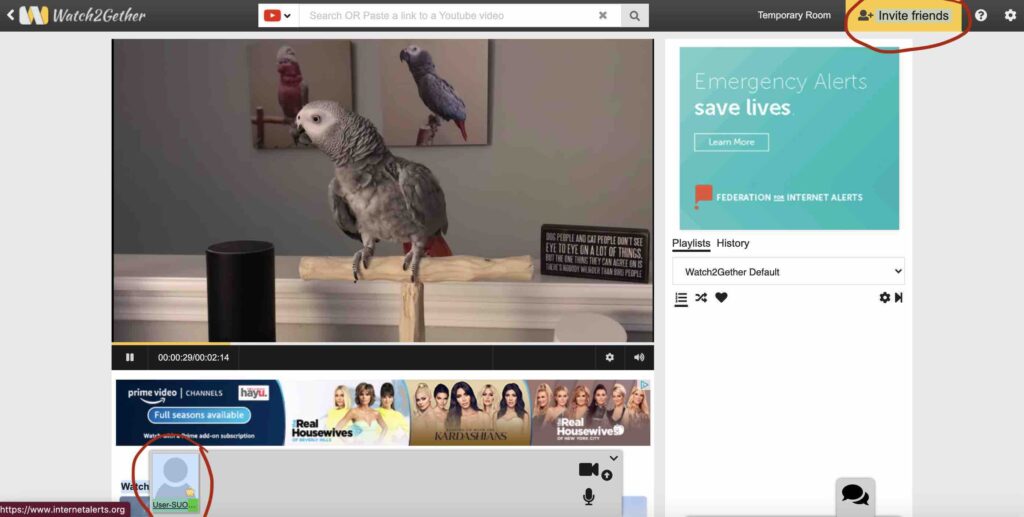
Go to the Watch2Gether website. You don’t need to create an account, and it’s free. Here’s what you will see:

Some points to note.

The room created is private by default and is deleted after 24 hours.

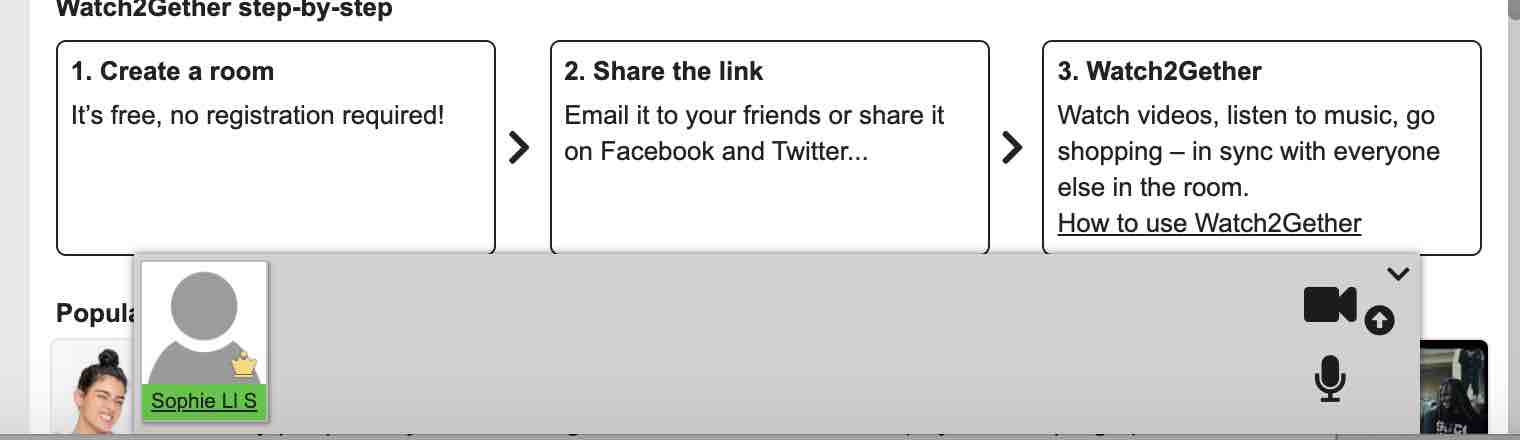
At the bottom left (circled in red), you can see my avatar. I haven’t uploaded a photo, but you can see a gold crown, showing I’m the room host. The username is generated randomly, but you can click and change it to something more suitable (you’ll see I’ve renamed myself Sophie Ll S here):

If you create an account (still free), your avatar will retain your username and you can keep your room permanently (meaning that you can save playlists of videos, for example, i.e. you could prepare suitable teaching material and place it in a playlist, in readiness for a class – or several, since you can have several playlists).

You can invite as many people as you like to join the room, using the ‘invite friends’ button (in yellow, top right of the screen). If you click on it, it generates a link that can be copied and sent to your students by any means you like (email, text, WhatsApp, etc.).

Here’s the link generated by the ‘invite friends’ button

When others join the room, their avatars will also be visible along the bottom of the screen. They can also change their assigned usernames.

Choosing source material (video)

Watch2Gether supports a number of sources of video material, including Youtube and Vimeo, as you can see in the image below.

apps supported by Watch2Gether

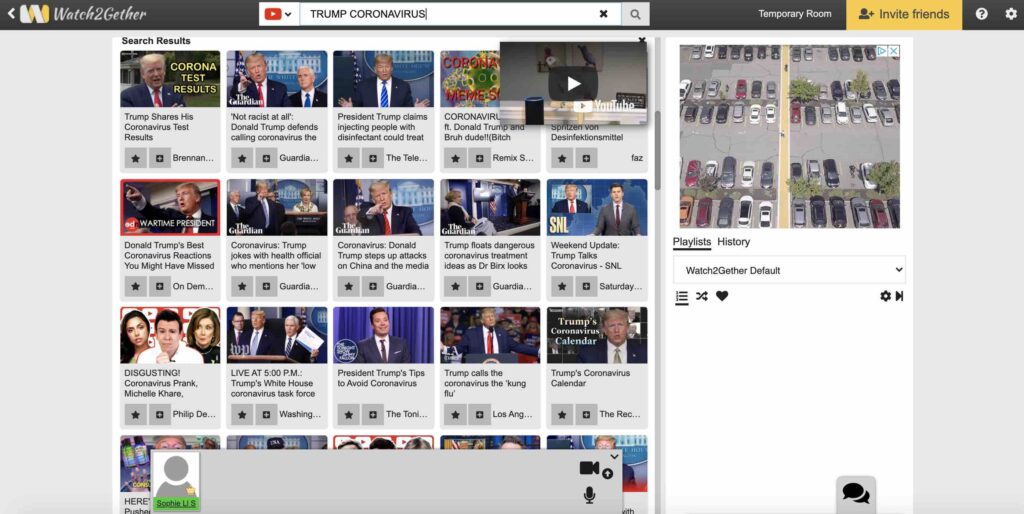
You can simply enter keywords in the search box to look for suitable videos. Here I’ve searched for ‘Trump coronavirus’ in the Youtube videos:

Results of a Youtube search with keywords ‘Trump coronavirus’

Or if you already know the url of a suitable video, you can just enter it into the search box.

You can also queue up a series of videos by putting them in a playlist, thus allowing you to prepare a whole class’s worth of material. In the screenshot below, you’ll see I’ve made a playlist with three clips about energy. You could create multiple playlists to prepare several classes in advance.

playlist with 3 speeches about energy

Watching the video 

At this point, all you have to do is press play, and everyone in the room will watch the same video at the same time. Watch2Gether synchronises the playback function. No need to play the video in two or more places (on the trainer’s device and on the student’s device) while trying to synchronise by counting ‘1, 2, 3’.

Caveat:

By default, everyone in the room can press pause at any time, or select another video!

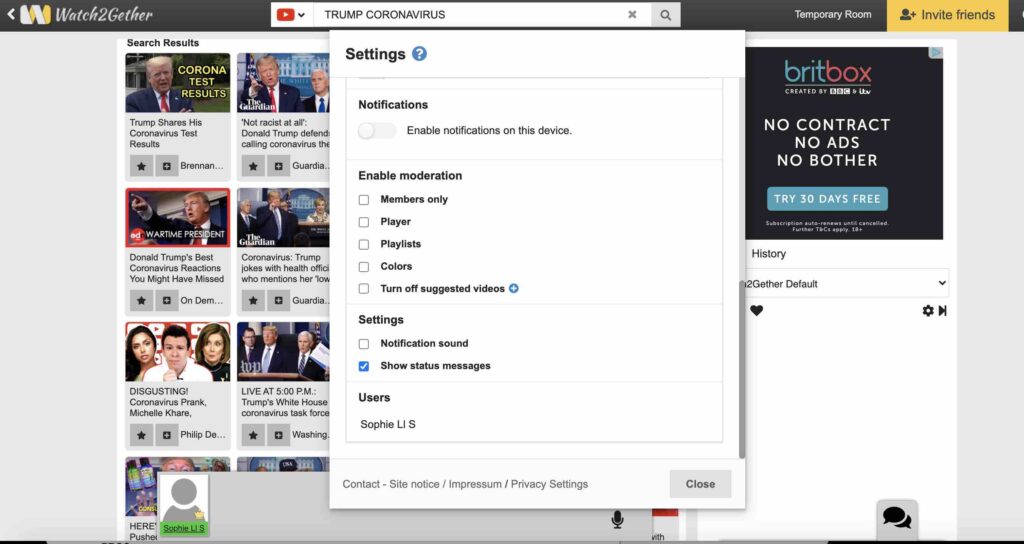
However, the host (i.e. the trainer, who’s created the room), can disable various functions to avoid chaos in the virtual classroom, by using the Settings (top right).

Have a look at the screenshot below, which shows you what the host can do by using the ‘Enable Moderation’ function.

enabling moderation: host-only commands
  • Members only: the room host has to approve people who want to join the room.
  • Player: Only the room host can select videos and control the playback of a video (play, pause, seek…)
  • Playlist: Only the room host can change playlists.
  • Colours: Only the room host can change the appearance of a room (colours and background image).

Interpreting

If you want to be able to see your students, ask them to switch on their camera. Definitely ask them to turn on their microphone, using the settings on their avatar button at the bottom of the screen.

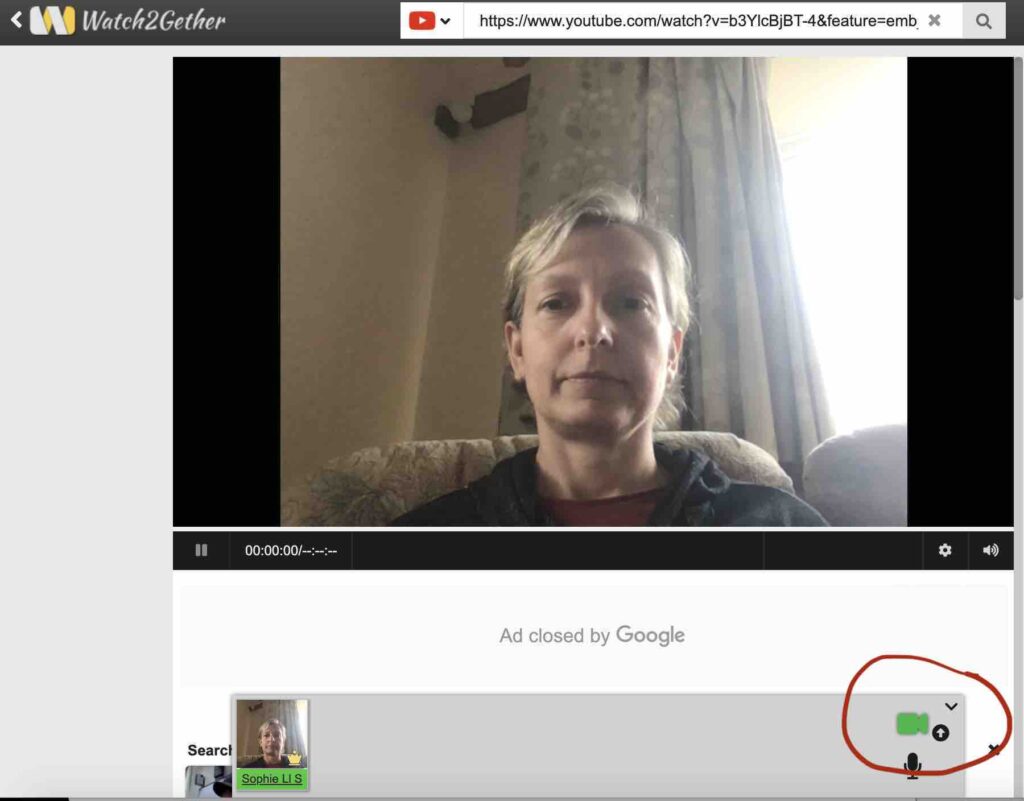
On the following screenshot, you’ll see that I have clicked on the video icon, making it turn green, so that my camera is switched on. I’ve circled this in red so you can find it.

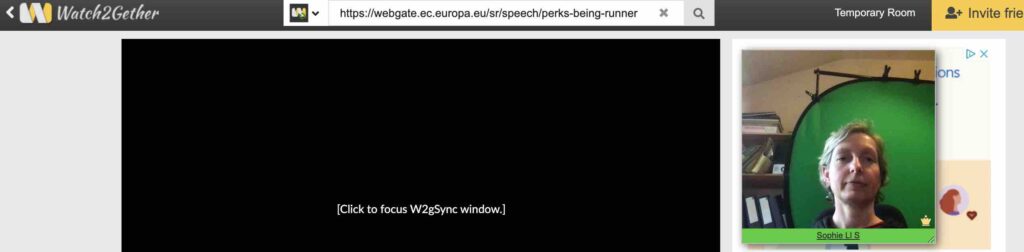
I’ve also clicked on my avatar (bottom left) to show you that I can place myself in the middle of the screen, so I’m more visible to my students.

Obviously if I were playing a video for interpreting practice, I wouldn’t put myself in the middle of the screen! To start, I would click play to start the video, and adjust the volume of a) the video (using my computer audio settings), and b) each individual interpreter, using the little microphone icon on their avatars.

If you are finding the avatars a bit small, you can enlarge them, which gives you more control over the volume setting. Here’s a shot of the bigger avatar; you can turn it into a thumbnail and move it around the screen:

Now, to listen to interpretation: let’s say I have 5 students in the class. I would turn 4 of them down to zero volume (mute), and turn up the fifth’s volume.

I’m now watching the video, hearing the video’s audio track, and listening to an interpreter at a volume of my choice. If I want to swap to another interpreter halfway through the speech, I simply turn down the volume of Interpreter 1 (to zero), and turn up Interpreter 2.

All the participants are able to do the same.

This feature also makes it possible to have a live speaker instead of a video as source material: simply have two participants’ volumes turned up (to a level of your choice).

One more useful feature: there is a built-in chat box (bottom right, see screenshot for the speech bubble icon circled in red), so you can type in vocab, links, etc.

The downside

OK, where’s the downside?

So far, it’s all good. You can play videos, have a live speaker, listen to your students in turn without having to enter and exit breakout rooms, adjust the volume (it’s not as flexible as true twin track, but it gives a lot more flexibility than the Zoom interpreting feature, where the original sound is around 20% and the interpreting at 80% volume, but you can’t control it at all), use the chat box, prepare material in advance…

Where’s the catch?

I’m sorry to say, the catch is in the limitations on source material. After all, the platform was designed for watching TV and films with your mates, not for interpreting practice. 

My first thought was that some of my usual sources of practice material, namely the SCIC Repository and Speechpool, would be ruled out. Anything protected behind a login (e.g. Speechpool material) is a problem, and the europa website which hosts the SCIC Repository is (obviously) not one of the apps supported by Watch2Gether.

However, hold tight because I’ve got the solution!

Speechpool

At the moment, Speechpool videos are hosted on Youtube, which allows you to get round the Speechpool login issue. Here’s how you can watch them on Watch2Gether. The method is a little roundabout, but effective.

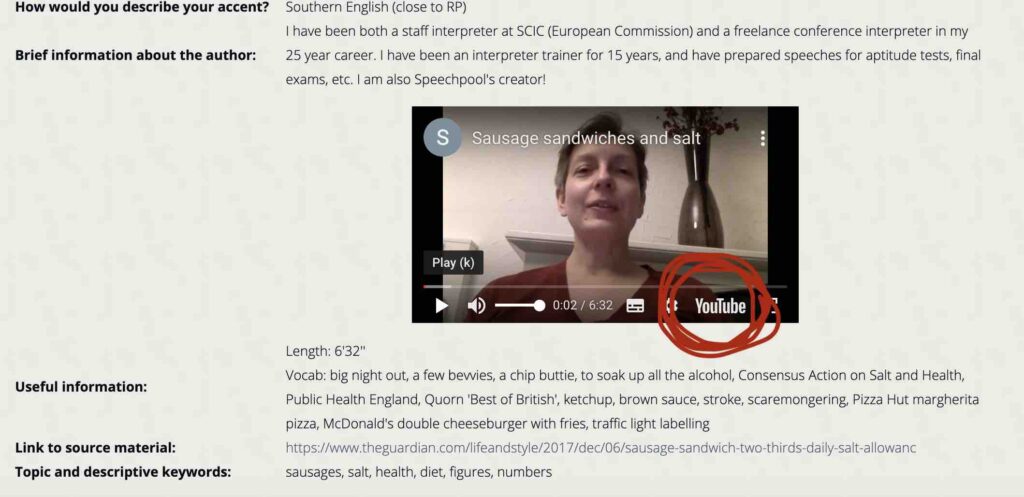
Login to Speechpool. Find the speech you want. 

In the bottom right hand corner of the video window, you’ll see the Youtube symbol. Click on it to view the speech in Youtube.

Copy the url from the address bar and paste it into the search box in Watch2Gether.

Voila!

SCIC Speech Repository material

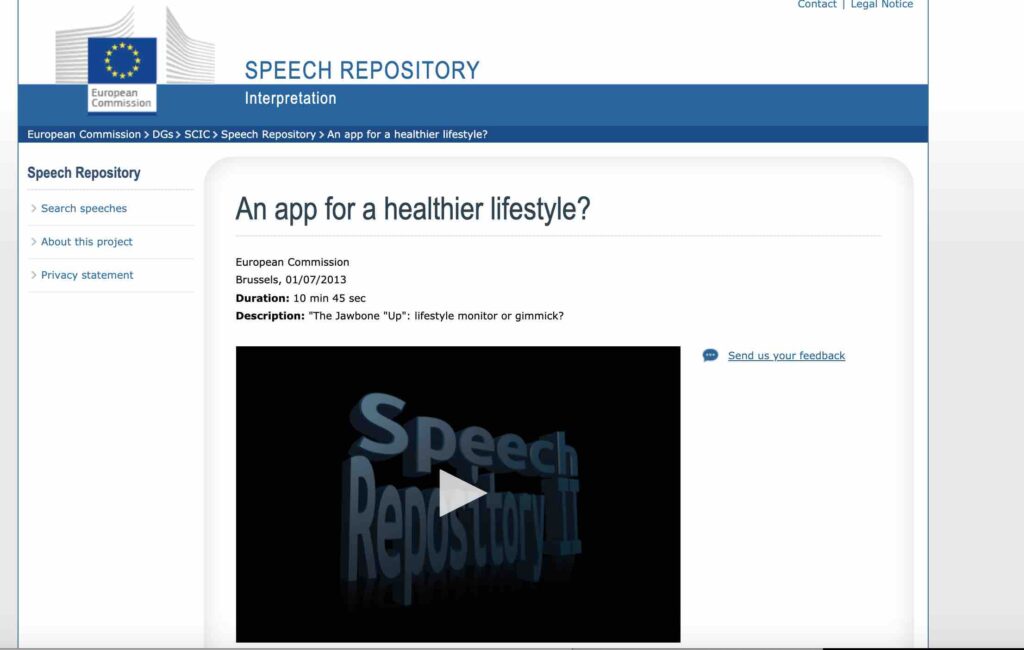
This is a different story. It requires more effort to set up than the Speechpool workaround, but it’s doable.

Go to the SCIC speech repository. Choose the video you’re interested in. Here’s an example:

Copy the url and paste it into the search box in Watch2Gether.

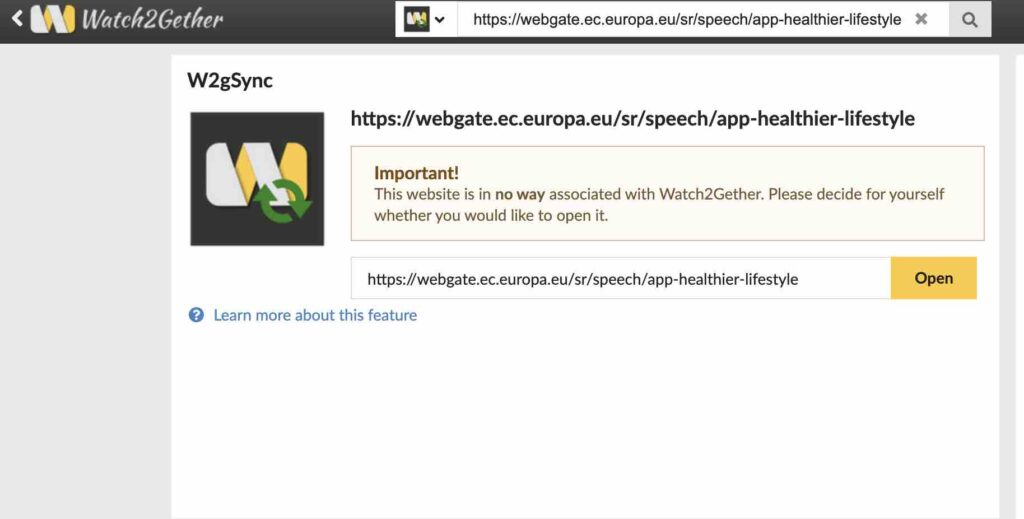
Because the europa website isn’t one of the apps supported by Watch2Gether, you (and everyone else in the room) will need to instal a browser extension on Firefox or Chrome to be able to watch this video.

Each user must now click on Open. The video will then open in a separate window, W2gSync will detect that video and makes sure that playback is in-sync with every user in the room.

So far, so good. When I tested this with a colleague, I was able to control the Play, Pause and Seek functions, playback was synchronised, and there was no time lag.

One disadvantage: because you’re now working in a new window (clicking on the Play/Pause controls in the WAtch2Gether window will not synchronise playback), it’s trickier to see the chat box.

There is a way around this, using the ‘Link’ feature in the Watch2Gether window, but I found it didn’t work, probably because of the way the europa website is designed (the ‘Link’ feature won’t work with Flash, for example).

Summary

OK, I’ve given you a lot of explanations and screenshots, which make the whole thing sound complicated, but it’s really not.

The massive plus, from my point of view, is that I can switch my online coaching and group calls to Watch2Gether and do things I can’t do on Zoom: synchronise playback, hear both audio feeds and adjust the speech and interpretation volumes separately, allow several interpreters to work from the same speech at the same time.

Best of all, I can do it all on one device, without messing about with a tablet or mobile, two sets of headphones, a mixer, or anything else.

PROS of Watch2Gether

  • Free
  • Relatively simple to use
  • Suitable for 1-1 sessions or groups
  • Only one device needed
  • Unlimited number of participants
  • Easy replay/pause of video, allowing you to check sections of the speech
  • Volume of speech and interpreter can be adjusted separately
  • Built-in chat function
  • Host can disable certain functions to stay in control

CONS of Watch2Gether

  • Limited options for source material (Youtube, Vimeo), but there are workarounds
  • There is no recording feature, so you can’t record students’ performances from within the app (unlike Zoom, for example). You could get around this by using screen recording software.
  • There is no screen sharing facility or whiteboard.
  • No breakout rooms; but as described above, you don’t need them.
  • No more than 10 video cameras can be on at any time, so you can’t see everybody’s face in a large group
  • Ads – they’re annoying, but we’re all used to tuning them out. You can get rid of them by signing up to w2g.tv PLus, but this doesn’t offer any real benefit in terms of features

Let me know what you think!

Interpreting Coach logo

Sophie Llewellyn Smith, writing as The Interpreting Coach, is a coach, interpreter trainer, conference interpreter, designer of online teaching materials, and creator of Speechpool. Follow the blog to pick up tips on how to improve your interpreting skills, sign up to my flagship membership site for English retourists, Rock your Retour, and check out the website for digital material to complement your face-to-face learning and empower you to take control of your learning. If you’re interested in personal coaching, feel free to book a free discovery call (although my availability is very limited at the moment).

CPD webinar

CPD blog post cover

For those of you who prefer to listen rather than read, I’ve recorded a 30 minute webinar about CPD.

I talk through a step-by-step approach to defining and prioritising your CPD needs. I also discuss various CPD opportunities, including volunteering, internships, dummy booth, webinars, and the like.

All of this is, of course, informed by my background as a conference interpreter operating on the EU market.

The principles I outline hold true for all interpreters, but my specific suggestions won’t always be relevant to everyone (e.g. public service interpreters).

CPD

CPD blog post cover

CPD = lifelong learning

So, you’ve just taken your final year interpreting exams, and you’re looking forward (hmm…) to entering the brave new world of post-coronavirus conference interpreting.

But your skills aren’t 100% up to scratch yet. Perhaps you need more practice in simultaneous. Or you’re thinking of adding another passive language. Or you’re totally stressed about your…stress management strategies. Or you need to learn more about Remote Simultaneous Interpreting platforms because…well, let’s not go down that rabbit hole.

Just imagine if one day interpreters all work from home…

The point is, all of this comes under the umbrella of CPD, or Continuing Professional Development.

Maybe you’re not a recent graduate. If you’re reading this, you’ve likely already discovered that lifelong learning means just that. It. Never. Ends. There is always more to learn. And that is definitely the case for interpreters.

But what? How? When? And even: what for?

In this blog post, I aim to help you get more clarity about your CPD needs and how to achieve them. If you’d rather listen than read, click for my dulcet tones (ahem) in your ear.

I’ve also produced a workbook for you. If you take the time to go through it and fill it in, you’ll have a solid plan that will see you through years of CPD.

CPD is the intentional maintenance and development of the knowledge and skills needed to perform in a professional capacity.

CPD is sometimes a legal requirement in order to practise a particular profession or obtain insurance. In Italy, for example, a certain number of CPD hours per year is a compulsory requirement for interpreters.

Even if evidence of CPD is not a legal requirement, it may be a compulsory condition of membership of your local professional association.

And beyond that, CPD is also about being the best interpreter you can be and setting yourself the highest possible standards.

CPD – key points

The definition I’ve given above contains a number of key ideas.

  1. ‘intentional’: CPD is self-directed, i.e. it’s up to you to identify your needs. Unlike a university course with a set list of modules, when it comes to continuing professional development, you need to diagnose your weaknesses and lacunae and come up with a plan (perhaps with some help).
  2. ‘maintenance and development’: maintenance is a minimum, so you can keep doing your job properly. It would be nice to think that once you’re qualified, you’re done. But we all know that note-taking skills get rusty, and if you don’t do simultaneous for a few days or weeks, you’re no longer match fit. So the bare minimum when it comes to CPD is having a plan to keep your interpreting skills and relevant knowledge up to standard. Development is what will allow you to progress in your career: take on new assignments or work in new markets (because of new expertise, a new passive language, a ‘retour’), or get promoted.
  3. ‘knowledge and skills’, ‘perform in a professional capacity’: interpreting isn’t just about technical skills (sight translation, note-taking, salami technique…). To be a professional in this field, you need all sorts of other skills and expertise (for example, networking and marketing to help you find clients and stand out in a crowded market).

A final point: the great thing about CPD isn’t that it isn’t rigidly defined. There are all sorts of things you could do to enhance your development, some formal, others informal. Alongside courses, workshops, webinars, and communities of practice, you could also find a mentor, shadow a more experienced colleague at work, read blogs or research papers, watch videos online, play language games, join a debating society, and more.

Defining your goal

You can only define your CPD needs if you know what your goal is, so your goal should be your starting point.

Are you hoping to work as a freelance interpreter for the UN? For NATO? Are you biactive and hoping to break into a local private market? Your needs will be quite different. For UN work, you’ll need specific passive languages, a strong grasp of geopolitical realities, and the ability to deal with very fast simultaneous and simultaneous with text. For NATO, your B language will have to be nearly on a par with your A language. To work on certain local markets, you’ll need to be good at marketing yourself and networking.

Here’s what you need:

  1. A vision of where you want to be and why (what country – one where your A language is rare, hence an asset; or a country that will help you develop your B language, or improve a C language? What type of interpreting: conference, or public service interpreting? Private market, or international organisations? Translation and/or other work as well, e.g. teaching, subtitling?). Remember that the answers to these questions will change, which is why you need to review your goals every so often.
  2. A good understanding of the skills you need. Does your ideal interpreting job require consecutive or not? Do you need specific IT skills? Must you be able to use a certain type of software?
  3. A clear idea of the standard and how far you are from achieving that standard. Do you know what standard is required in order to pass an EU accreditation test, if that is your ambition? If not, you need to find out.
  4. A list of priorities. You can’t address all your weaknesses at once.

Take a few minutes to think about questions 1-3, and jot the answers down on a piece of paper – or use my workbook . Read on to find out more about defining, refining and prioritising your CPD needs.

Defining your CPD needs

The exercise I’ve just asked you to do was intended to help you identify what you’re aiming for, and what is required to fulfil that ambition.

Now you need to work out how much of a mismatch there is between those requirements and your existing skills and knowledge.

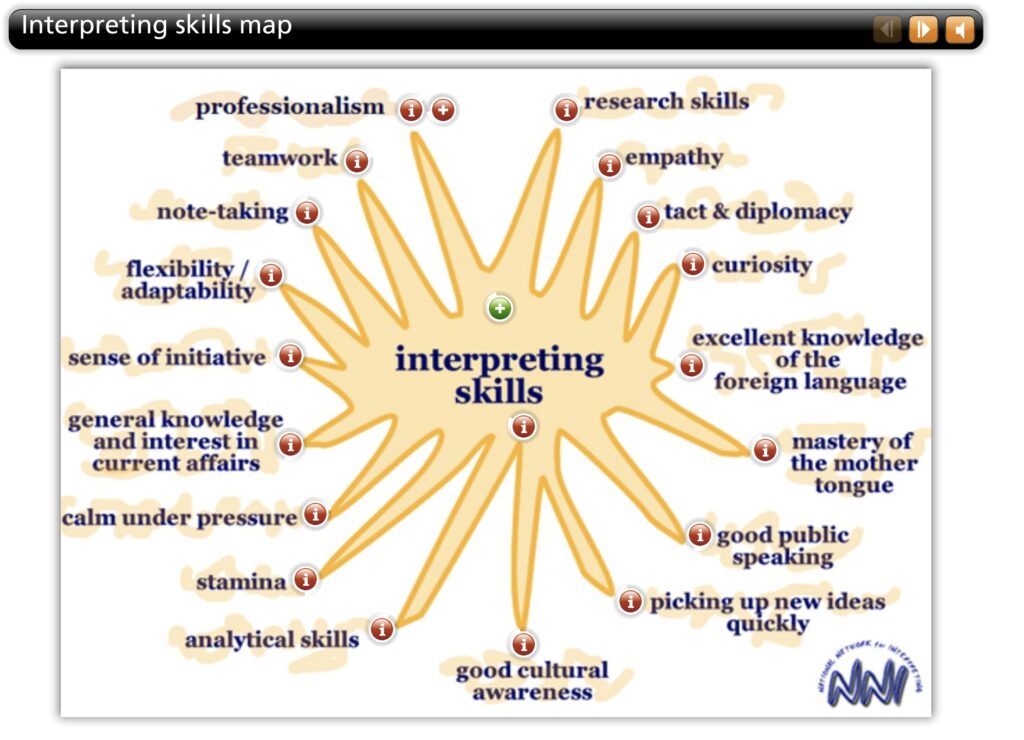
I like to think of all the elements that make up a top-notch interpreter in a very visual form, using a mind map (some of you may call it a spider diagram).

Here’s an example from the National Network for Interpreting website.

NNI interpreting skills map

I talk through the skills map in more detail in this video:

Time to get down to the nitty gritty!

Sharpen your pencil, get yourself a cup of tea (or a latte, or whatever floats your boat), and get your thinking cap on, because it’s time for a skills audit.

Skills audit

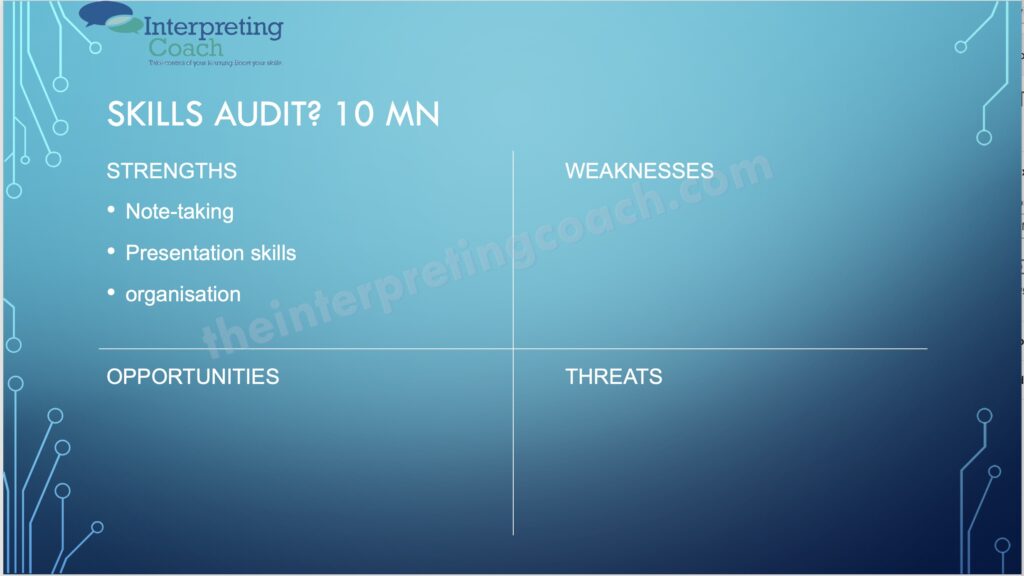
Have you heard of SWOT analysis? It’s an approach often used in business, to determine the a company’s strengths, weaknesses, threats and opportunities, and then to decide on a plan in the light of these insights.

A SWOT analysis, also known as a skills audit, is a very useful tool in your arsenal. It’s something I encourage interpreting students to do at the beginning of their interpreting course, and again a few weeks before their exams, so they can decide where to focus their efforts.

It’s also a very useful way of establishing your CPD needs.

Divide your page into four, and write down the four headings: strengths, weaknesses, threats, opportunities. Like this (or follow along in the workbook):

SWOT analysis

I’ve put some examples in the ‘strengths’ column, just to give you an idea. Obviously this is a very personal exercise.

Think about the interpreting skills mind map (which you can of course break down into even more detailed skills; for example, for public speaking, you could consider pronunciation, intonation, ‘ums’, fillers, eye contact, etc.), and try to classify these skills as strengths or weaknesses of yours, in the light of your ‘vision’ – i.e. where you want to work, for whom, and what standard is required.

Perhaps public speaking is one of your strengths, but stress management is not.

Perhaps you are a people person, and very good at networking, but you’re a bit chaotic and you need to work on business skills and being more organised.

Write it down!

Then think about those factors that are external to you: the threats to your development, and the opportunities. Again, these are very personal.

Your threats might include lack of money, or family obligations that mean you can’t travel, or lack of equipment (headphones, or a laptop), or Brexit.

Your opportunities might include willingness to travel, or a partner who speaks one of your passive language, or good contacts in the industry.

Make a note of everything.

Spend a few minutes thinking about how you can use your opportunities and how you can minimise your threats.

Now we’re going to focus on your weaknesses, because these are your CPD needs, i.e. these are the areas of skill or knowledge that are ripe for development.

Refining your needs

It’s one thing to know what you need to improve (i.e. your weaknesses), and it’s another to know how to improve them.

What course would best suit you? Should it be intensive or spread out? Would you be better off working alone or with a coach?

Sometimes the answer isn’t as straightforward as you think.

I’ll give you an example. My daughter is really good at maths, and she loves it. But when she sees a question type she’s never tackled before, she gives up immediately, wailing that she doesn’t know how to do it, and often bursting into tears. This is not a skills problem, it is a mindset problem. There is little point getting her extra maths tuition when she knows the answers already. What she needs is an approach that will boost her confidence and help her develop problem-solving abilities and a growth mindset.

So now that you’ve identified your weaknesses, you need to examine them in a way that will help you determine how to tackle them.

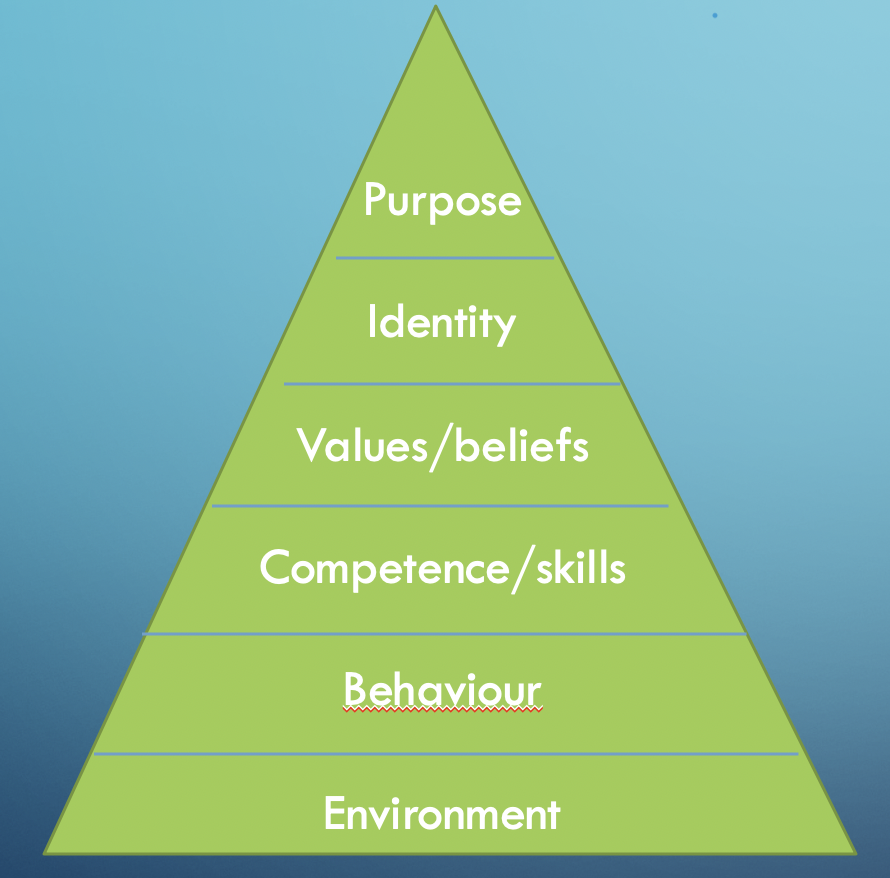
To do this, one approach I find useful is Dilt’s logical levels (from neuro-linguistic programming, if you’re interested).

Dilt's logical levels

If you want to make changes in your life (in this case, improving your skills or knowledge), you need to understand at what level you’re operating. Often, the way you talk about these challenges will give you hints.

For example, if you say ‘I don’t do enough interpreting practice, because my office is so cluttered and I keep getting interrupted’, this is an environment problem, and the environment is what you need to fix!

If you say things like ‘I don’t really have time to work on my retour’, or ‘I’m always meaning to listen to podcasts, but I have so many other things to do first’, this could be a sign that you are procrastinating, and you need to find strategies to address that behaviour.

Phrases like ‘I don’t know how to do this’, ‘I’ve never done simultaneous’, ‘I’ve just been asked to teach online and I’ve never done it before’, ‘I haven’t done consecutive for five years’, sound like a skills gap, which can be addressed at the level of competence – you can find a course, workshop, coaching opportunity, etc.

On the other hand, if you say something like ‘I find sight translation really difficult’, or ‘I hate dealing with numbers’, ‘or ‘I’m really bad at consecutive’, this could either be a skills gap or a mindset/confidence issue.

And if you’re saying things like ‘I can’t be bothered to do this’, or ‘I don’t see the point of this for me’, or ‘interpreters shouldn’t be asked to do this’, this is a reflection of your beliefs or values, and you will have to examine those before deciding whether you need further training.

Phew! Bet you didn’t realise that CPD would involve so much soul-searching, right?

You’re nearly there, though. And remember, you can use my workbook to guide you through this process.

OK, your final step is to prioritise your needs.

Prioritising your needs

This should be relatively quick, now that you have laid all the groundwork.

• Think about your lacunae in the light of Dilt’s logical levels, to help you understand how to tackle them.

• For each weakness, ask yourself: how important is this to me? How essential is it to develop this competence now? Remember, you can’t do everything at once. Some skills may need immediate attention because, say, you’re applying for a job right now.

• Distil your CPD needs to 4 or 5 key skills or areas of knowledge.

Planning your CPD

Reflect on how to get from A to B. You’ll need to a) do some research, to find out what’s available in terms of workshops, courses, practice groups etc. that might meet your needs, and b) consider how much time you have available.

Make a list for each of your 4 or 5 key areas.

There’s an increasing array of CPD options available for interpreters. I won’t list them all here, because they won’t all be relevant to you, but you can have a look at this free list if you happen to be a recent graduate with mainstream European languages, and your ambitions involve working on the conference or institutional market in Europe. I’ve listed various volunteering, internship, and networking opportunities, as well as online resources for conference interpreters, such as course and webinar providers.

Reflective practice

…but it’s not all over!

The value of reflective practice in an educational setting and in the workplace is increasingly recognised.

It’s also important to keep a record of your CPD efforts in case you ever need to provide an employer or professional association with evidence of your learning.

For this reason, I highly recommend keeping a combined learning journal and portfolio of your CPD work.

You can find an example – guess where? – in my workbook , but the idea is fairly simple: note down the date of any CPD activity you engage in, the provider, the type of activity (remember, this doesn’t have to be a formal course. It could be reading in your own time, or contributing an article to a publication, or doing outreach work). Write down what you found useful about this activity, how you will apply it in practice, or what you would do differently next time.

DATEACTIVITYPROVIDERWHAT WAS USEFUL?IMPLEMENTATIONNOTES
01.01.2020webinarAIIC
15-21.06.2020WISE workshoppeer group

To flesh this out into a portfolio, keep a note of your needs and goals on the first page, and review these regularly (say, every 6 months or annually). Also keep copies of any certificates you obtain after attending CPD courses.

Two key areas for development

I’ll wrap up with a couple of areas I think are increasingly important, given the situation on the interpreting market, and also the way the world has developed in the past twenty years or so. I’m venturing beyond the narrow limits of interpreting skills here, into other skills and areas of knowledge.

Business skills

Newcomers to the interpreting market need to be much more professional in how they present and market themselves these days, I think. More and more, language professionals are running a language business, and they need the right skills to allow them to do so.

I won’t go into detail here. Just think about where you are with regard to the following:

  • Administrative procedures for freelancers in your country, including health insurance, VAT, pension arrangements
  • Business skills such as accountancy, invoicing, client management
  • Making sure you have the right equipment, including a laptop or tablet, headphones, jacks, webcam, etc.
  • A solid and visible business presence, including a good, up-to-date CV, business cards, a permanent (professional looking!) email address, and possibly a website
  • ?Preparing for remote interpreting. Are you intending to go down this road? What extra skills do you need?
  • Marketing: in a crowded market where interpreters are often treated as commodities (and don’t get me started on working conditions during the COVID pandemic…), you need to understand your value as a skilled professional. You could consider a seminar such as Julia Poger’s Know your Worth.

Health and wellbeing

Interpreters have very specific needs when it comes to health and wellbeing. The very sedentary nature of our work, the increasing use of computers and screens, and the stressful aspects of interpreting, should lead you to try to establish good habits from the start.

Here are a few key areas to think about:

  • having an ergonomic office set-up (height of chair, distance from screen, etc.)
  • eye strain
  • hearing. Amid increasingly frequent reports of acoustic shock, it’s important to have regular hearing tests.
  • voice. Your greatest tool as an interpreter. Look after it!
  • general health (nutrition, exercise). Conference interpreters are prone to back problems: we spend too much time seated, and our position isn’t always ergonomic.
  • stress management. I could say all sorts of things about this (and I often do, in seminars and webinars), but I’ve already written thousands of words in this blog post, so I’ll keep it short. Different approaches to stress work for different people, so try to find what works for you. If you’re looking for a short course with a holistic approach, that covers the basics of relaxation, meditation, and nutrition, try Gabriela Bocanete’s course, which involves delightful Yoga Nidra sound baths.

Enjoy it!

OK, that’s enough! That’s it!

CPD can be fun: it’s satisfying, because you’re learning something and opening up new career opportunities, but it’s also a great way to meet new people, make friends, and feel connected to your ‘tribe’.

Good luck!


Learning through reflection: the critical role of reflection in work-based learning (WBL)

Ruth Helyer, Journal of Work-Applied Management, ISSN: 2205-2062.  Publication date: 6 October 2015

Interpreting Coach logo with strapline

Sophie Llewellyn Smith, writing as The Interpreting Coach, is a coach, interpreter trainer, conference interpreter, designer of online teaching materials, and creator of Speechpool. Follow the blog to pick up tips on how to improve your interpreting skills, and check out the website for digital material to complement your face-to-face learning and empower you to take control of your learning. If you’re interested in personal coaching, why not book a free discovery call?

error

Enjoy this blog? Please spread the word :)

By continuing to use the site, you agree to the use of cookies. more information

The cookie settings on this website are set to "allow cookies" to give you the best browsing experience possible. If you continue to use this website without changing your cookie settings or you click "Accept" below then you are consenting to this.

Close